Your first subscription plan
A subscription plan (also called an “offer”) is what turns a regular product into something customers can subscribe to. It defines the billing frequency, any discount, and which products it applies to.
Create a plan
Open Plans
In the Curobi admin, go to Plans and click Create plan.
Name the plan
Give it a name customers won’t see directly, but that helps you tell plans apart — e.g. “Coffee — every 4 weeks.”
Choose a billing type
- Pay-as-you-go — the customer is charged at the start of each delivery cycle.
- Prepaid — the customer pays for a set number of deliveries up front.
Set the frequency
For example, every 2 weeks, every month, or every 60 days.
Optionally add a discount
- A flat percentage or fixed amount off, or
- A tiered discount — one rate for the first N billing cycles, a different rate after (useful for a “20% off your first 3 boxes, 10% after” offer).
Optionally set min / max billing cycles
For example, require at least 3 cycles before a customer can cancel, or cap a prepaid plan at 6.
Attach products
Attach the products or variants this plan applies to.
Save
Click Save. The plan is live immediately — any attached product will start showing a subscribe option once you add the storefront widget.
The form also has a Schedule section. Leave it on Rolling — each customer is charged from their own signup date — unless you want every subscriber charged on the same date, which is a fixed calendar and needs the Pro plan.
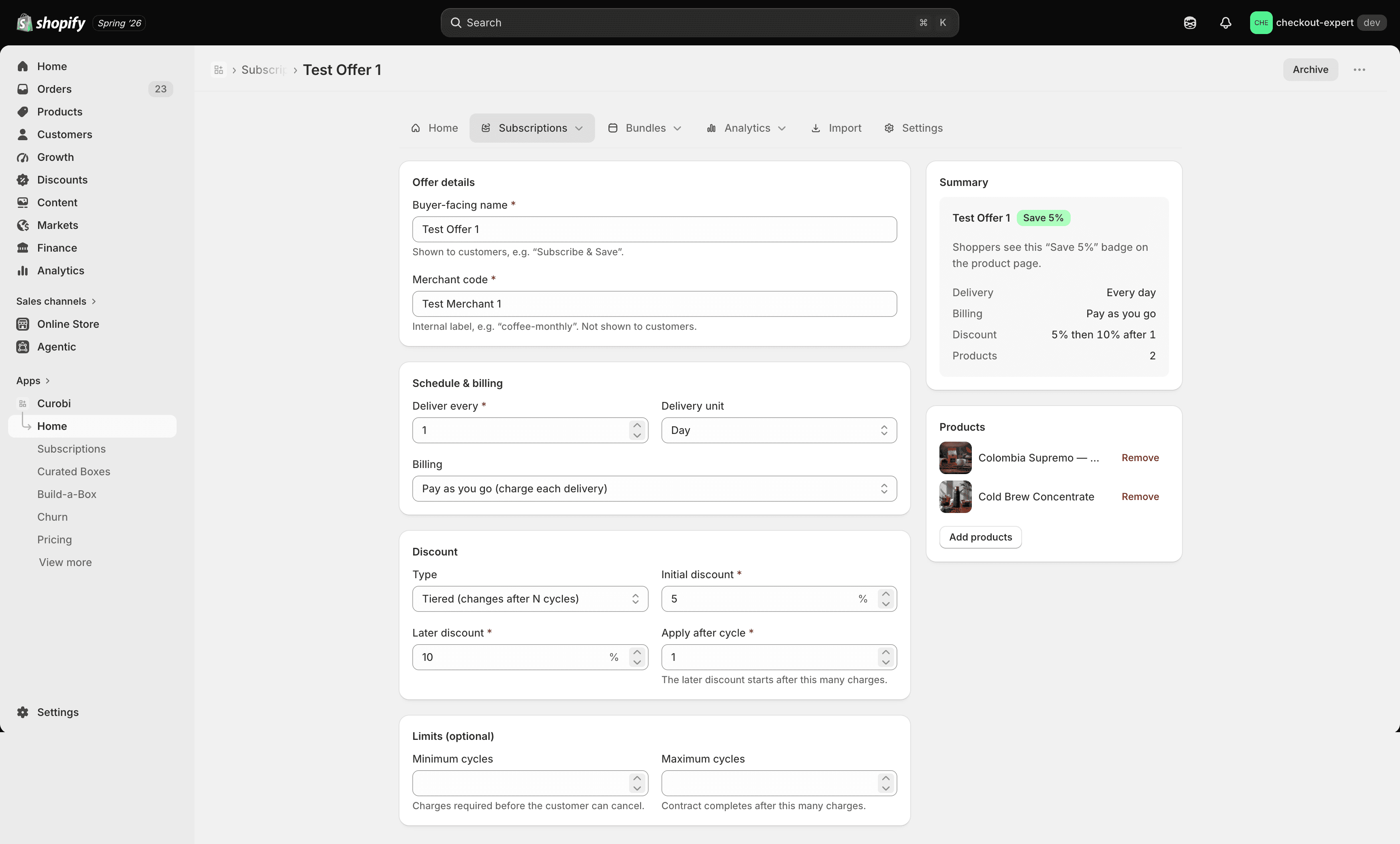
Editing, archiving, and reactivating
Editing a plan applies to new subscribers going forward. Existing subscribers keep the terms they signed up under unless you explicitly change their contract.
- Edit a plan any time — changes apply to new subscribers going forward. Existing subscribers keep the terms they signed up under unless you explicitly change their contract.
- Archive a plan to remove it from the storefront without deleting its history. Existing subscribers on an archived plan keep billing normally — archiving only stops new signups.
- Reactivate an archived plan at any time to make it available again.